
The Daily Carnage
The savvy marketer's hub for industry news, insights, resources, and culture.
Today’s Issue
Trending
Issues
View All
A Nifty Way To Visualize All Your Projects
JANUARY 29, 2020Wouldn’t it be nice to visualize all parts of a project as it’s worked on by any team member?
We thought it’d be nice. Luckily, our Digital Strategist, Stephen, swooped in with a handy Chrome Extension called Elegantt. See the great thing about Elegantt is that it can be paired with Trello, and alas, our project management desires were answered.
Let’s be honest, folks. What do you need from someone else to get your job done? What does that someone need from you to get their job done? This relationship is called “task dependency.”
Example time! Imagine going to Taco Bell and ordering a dish that your typical marketer would like to eat. Like, say Doritos Locos Tacos. The individuals involved in this entire process of enjoying your Doritos Locos Tacos include you, the server, and the cook.
- You depend on the server to take the order.
- The server depends on the cook to prepare the food.
- The cook depends on the server to deliver the food.
- The server depends on you to pay the bill.
Alrighty, instead of servers and cooks, it’s designers, developers, SEM strategists, etc., and it’s all a process of getting the finished product to the client’s plate. Elegantt makes these task dependencies easy to recognize with a linear timeline and deadlines that you can easily set.
Since Elegantt syncs with Trello, every card you add will be reflected in Elegantt after you refresh the page. It’s a seamless way to take what you’re already doing on Trello and further organize what you’ve laid out within projects.
Check out the full article where Stephen goes into further detail of how Trello and Elegantt are used at our office.
How BarkBox Took an Obscure Holiday and Turned It into a Killer Social Media Campaign
JANUARY 28, 2020Digital Marketer’s look inside a holiday campaign from BarkBox was the overwhelming winner in yesterday’s poll. So, let’s get to it!
Any of y’all throw a party to celebrate National Squirrel Appreciate Day on the 21st? No? Well, the brave marketing souls at BarkBox took this obscure holiday and made it a hoot and a half after going on a social media rampage.
The holiday campaign covered a hostage situation on Barkbox’s social media by some squirrels who were pretty peeved. The objective here was to increase brand awareness. And boy, the world tuned in. Engagement from BarkBox’s valiant effort was astounding.
How will they follow up with the success? Digital Marketer has a few thoughts…
- Taking advantage of user-generated content to boost brand awareness. UGC allows customers to be salespeople. The campaign had fans sharing all kinds of dog/squirrel content.
- Harness the power of retargeting. Tons of new folks visited BarkBox social pages and the tracking pixel was waiting.
- The more people that know you the higher chance of conversions. Though we can’t be sure of the actual data, Digital Marketer is pretty dang sure BarkBox saw one heck of a return.
The lesson here is to take a chance on weird and focus on awareness. Telling customers “get 10% off your next order” doesn’t cut that cake anymore. It’s such a bland thing to say offering zero upper-hand over your competitors.
On the other hand, showing them a ransom note from angry squirrels will get attention. Click through to get snapshots of the BarkBox campaign in case you didn’t see it on the 21st.
How the Facebook Algorithm Works in 2020 and How to Make it Work for You
JANUARY 27, 2020Ready to learn how Facebook’s algorithm changed for 2020? The crew at Hootsuite outlined the changes since creation and boy is it a hefty list. More importantly, they highlight how the algorithm works right now and what you need to do to get it working for ya.
The algorithm we know today works off a variety of ranking signals that order posts in the feed by the likelihood of enjoying them. These ranking signals are largely dictated by behavior. SO how do you take advantage?
Let’s dive in…
1. Start conversations that get people talking to each other. The objective is to get people interacting with your page as they would a friend. When you begin building those likes, shares, and comments, Facebook will see your page as valuable and reward you for the effort. Because it does take effort.
2. Post when your audience is online. Listen, y’all have to stop talking to yourselves. Jump into Facebook’s Page Insights to find out when your audience is online and talk to them. Hootsuite suggests,
-
- “B2B brand posts perform best between 9am-2pm on Tues., Wed., and Thurs.”
- “B2C brand posts perform best at noon on Mon., Tues., and Wed.”
3. Never post content that will get you down-ranked. Facebook specifically told us the following categories will get your Page down-ranked immediately:
-
- Links to sites that use scraped or stolen content with no added value
- Borderline content (a.k.a offensive but not prohibited content)
- Misinformation and fake news
- Misleading health information or dangerous “cures”
- “Deepfake videos” or manipulated videos flagged as false by third-party fact-checkers
4. Post high-quality videos longer than 3 minutes. Facebook favors quality, original video. Hootsuite offers these guidelines to keep in mind for video creation on Facebook:
-
- Videos that people search for and return to
- Videos that people watch past the minute mark, and that are longer than 3 minutes
- Videos that aren’t repurposed from other sources and that have plenty of added value.
5 more tips, friends. You know what to do!
7 Actionable SEO Tips for 2020
JANUARY 26, 2020Amy Porterfield’s recent podcast Say Goodbye to Imposter Syndrome and Skyrocket Your Business Success came in at such a close second that we still wanted to add the link for you curious cats.
But alas, the winner of Friday’s vote was an episode from Neil Patel and Eric Siu’s Marketing School. Sit back, relax, and get the notes below on the 7 Actionable SEO Tips for 2020.
[01:25] Hack #1: Eric says too much energy is focused on the top of the funnel keywords. There’s less competition with middle/bottom of the funnel or conversion-related keywords.
[02:25] Hack #2: Neil wants you to leverage FAQ schema (WordPress’s Structured Content plugin). This plugin generates related questions in a dropdown beneath your listing often giving more clicks and helping outrank other sites.
[03:15] Hack #3 Speeding up your site for better user experience! Two common tools to use is Google’s PageSpeed Insights or BatchSpeed. Make sure your site load speed is less than 3 seconds.
[04:04] Hack #4 Adding tools to your website. Check out CodeCanyon for a plethora of industry-related tools for natural and easy link generation.
[04:30] Hack #5 Optimizing your organic click-through rate. Pay close attention to titles and meta tags!
[04:54] Hack #6 Integrating media into your content. The objective here is to increase loyalty and time-on-site by adding podcasts or youtube videos.
[05:35] Hack #7 Satisfy searcher intent. Your goal should always be to drive a better experience to avoid high bounce rates.
We love the Marketing School podcast because this duo does not mess around. In about 5-minutes Neil and Eric share all kinds of SEO goods. Smash the button to listen to the podcast yourself!
Introduction to Chrome Developer Tools
JANUARY 22, 2020Want a quick and dirty way to test an idea with your website?
Today’s Tactic feature is coming straight from one of our genius web developers. We’re sharing a best-kept secret that’s gonna help you get your test on – the Chrome Development Tools.
What is the Chrome Dev Tool?
Think swiss army knife. It’s having a variety of tools in one nifty place. With Chrome Dev Tools, you can view and manipulate pages, debug and test code, audit for performance and accessibility, and much more. All totally free.
How do I use the Chrome Dev Tools?
Let’s say you’re in the middle of a rebrand and want to test out new fonts or colors. You can use basic prototyping with Dev Tools. Want to learn how?
- Right-click any element on a web page and then choose “Inspect” from the menu.
- This will launch the Dev Tools “Elements” panel and show you the underlying HTML of the page you’re on (with that element highlighted).
- In the corresponding “Styles” panel, you can see which CSS styles are directly affecting that element and tweak their values.
Easy peasy! Make temporary changes to any element on a page and preview the results in real-time before diving into any code.
Read the full blog and check out the video tutorial. Smash that button!
Book Talk: Bored and Brilliant
JANUARY 15, 2020Today’s tactic section comes from our very own Director of Digital, Diane!
Technology sucks up all the white space in our lives. Look around you the next time you’re waiting in line at the grocery store…or taking a stroll outside…or even stopped at a red light. In most cases, it’s phones up / heads down. I am so guilty of this. With an endless scroll of distraction just a thumb nudge away, who has time to be bored?
But without downtime, imagination can’t breathe.
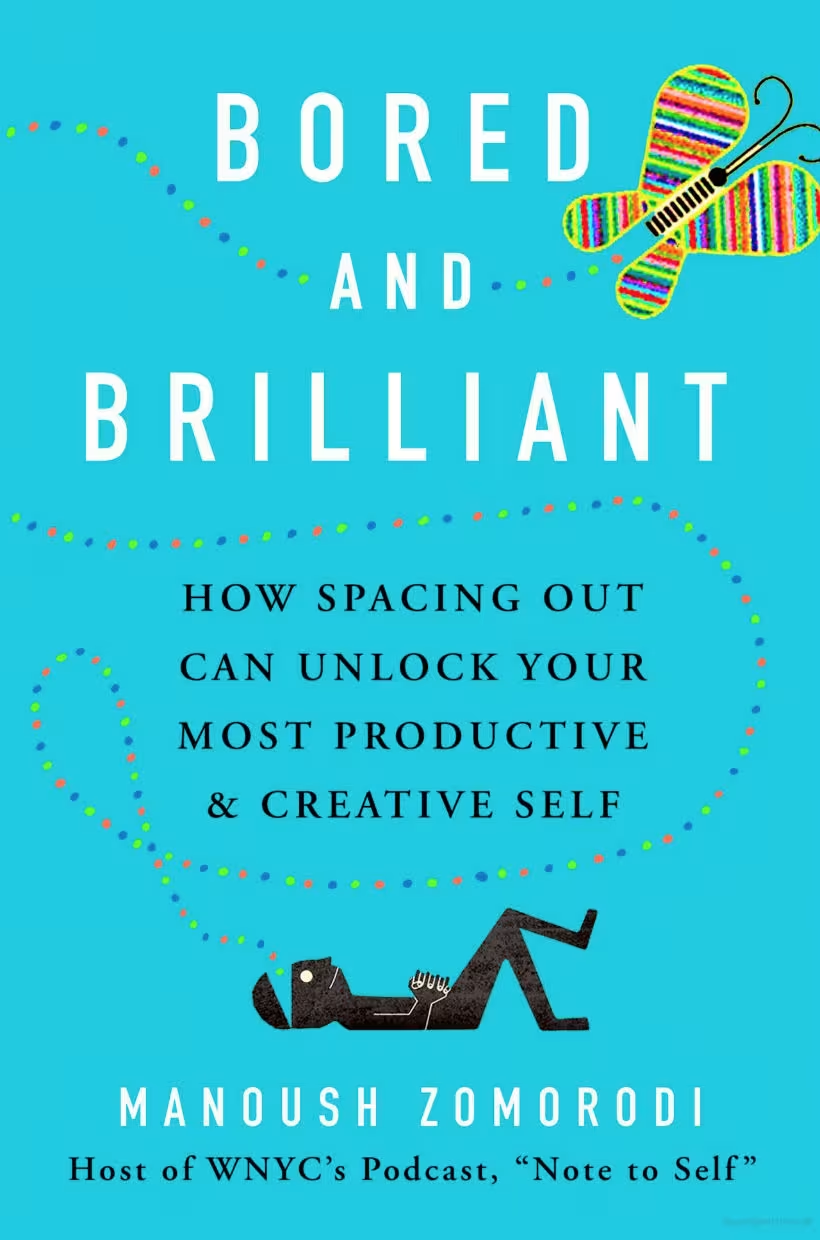
That’s the basic premise of the book, “Bored and Brilliant: How spacing out can unlock your most productive and creative self.” The author is Manoush Zomorodi, host of WNYC’s (brilliant) podcast Note to Self.
Through first-person stories and expert testimony, Manoush lays out the case that people could be better at their jobs if they weren’t always plugged in. Skill building, innovation, and entire economies could be at risk because “fast thought could make for slow growth.”
In other words, we’re too dang distracted to do the important work of imagining, creating, and exploring. Our phones are making us stupid. The future of mankind is at risk.
How to Inspire People to Love Your Brand the Way They Love Harry Potter
JANUARY 14, 2020Y’all voted and today we’re covering a recent podcast from MarketingProfs where the host talks about how to inspire people to love your brand with author, David Meerman Scott.
Think about it from your own perspective for a minute. What things in this world captivate your attention so much that you consider yourself a fan? And what makes you dedicated to those things?
The hosts conducted some interviews and found at its core a fandom is really all about the tribe. When you share a passion with like-minded people, that’s what drives a fandom.
3:10 – The biggest missed opportunity in marketing is putting a ton of effort into getting attention from people who have no interest instead of mobilizing people who already show interest.
3:35 – Scott gives his insight on where the idea of turning fans into customers come from.
5:00 – The pendulum swung too far in superficial online communication. People are hungry for personal interaction and connection.
9:35 – The neuroscience behind a fandom starts with a personal connection or humanity.
12:15 – The four levels of proximity: public space (20+ feet), social space (between 4 and 20 feet), personal space (within 4 feet), and intimate space.
13:10 – As a business, what does it mean to get your fans in close proximity. (Use TDC as an example. We use the Yearly Carnage to round up like-minded folks and we have a blast learning all things marketing)
15:20 – Using the philosophy behind mirror neurons, take photos or videos where you insert yourself into the personal space of the viewers to build strong connections. (A similar example would be how well we feel we know movie stars.)
17:55 – The selfie is fabulously powerful because you’re showing up in close proximity, aka less than 4 feet, and you’re most likely looking straight into the camera.
19:20 – The host talks to Scott about great examples of B2B fandoms like Microsoft’s partner channel. It’s not about controlling your products/services. It’s about letting your fans take over.
21:50 – How car insurance company, Hagerty maintains a fandom of over a million peeps.
23:40 – How can a small or medium-sized business start creating a fandom of their own? Two things you can do right now:
1) Get real and eliminate all the gobble goop language on website, social, and marketing. If your mother can’t understand what you do from the description on your website, you’re doing something wrong.
2) Eliminate all stock images and practice proximity with real people including video and photos.
If you wanna listen to the full interview, jump to 2:43 for the start.
5 Strategies for Building Strong Customer Relationships
JANUARY 13, 2020Our friends at DirectLync are giving us a rundown on a few strategies that maintain strong relationships even after the first purchase. Keep reading👇
- Personalization. You’ll be more successful in making the sale when you treat consumers like a person, not a walking wallet. Take advantage of creating unique, personal experiences. The more you learn about your customer the easier it is to throw in that personal touch in email, social media, or chat.
- Ask for feedback. Getting any kind of input helps business owners pivot when necessary to better serve an audience. On the other hand, sometimes your audience just wants to be heard. Don’t wait for your audience to make the first move. Ask for feedback. You could send surveys or make the daunting phone call. After about five or six calls in, the phone calls get easier, promise.
- Show appreciation. Folks, our mommas taught us a simple thank you can go a long way. The same rings true for business. And there are so many ways to show appreciation. Send a thank you message after a purchase, mail out a discount code, open up a referral/loyalty program, or our fav – whip out the swag.
- Follow up. Enter the wonderful tool that’s customer relationship management or CRM. Manage interactions, track leads, streamline processes, and identify sale opportunities all with CRM. It makes the task of following up a dream.
- Share knowledge. If you got skills, share it! One of the best things you can do for your audience is share. After all, business/customer relationships are about communicating and providing help.
Get the insights straight from DirectLync. Smash the button.
A Simple To-Do Content Audit with 6 Questions
JANUARY 12, 2020When’s the last time you did a content audit? Can’t blame ya if it’s been a while. It’s not exactly a walk in the park. But it’s a necessary evil, folks.
Content audits bring health to your brand, online visibility, and overall business. And Content Marketing Institute wants to make it a tad easier for you to conduct one.
Let’s get started.👇
Before jumping into asking the right questions, CMI wants you to get into the right mindset. Get in the minds of your audience with profile reviews or whatever is needed to have a fresh understanding of your audience. Now the questions:
1. Is the content still relevant?
Blogs get tired too. Update stats, data points, or time-sensitive references to give blogs its much-needed beauty sleep. Also, check on outsourced links to see if it still provides value. Do this at least once a year.
2. How many people visit the post?
The data never lies. Use Google Analytics to check in on the following metrics: avg organic search traffic per month, avg overall traffic per month, bounce rate, and avg time on page. Keep your audience and goals in mind when you review the data.
3. What engagement is the post receiving?
Your social media accounts can give great clues to content health. Not just likes but pay attention to shares and quality of comments.
Three more q’s to review. You know what to do to get more!
Insights
View AllStrategy7 MIN READ

The AI SEO Checklist: How to Stay Visible in the Age of AI Search
Ana Toigo
Marketing5 MIN READ

Top Marketing Tools That Offer Nonprofit Discounts (2026)
Rich O'Donnell
Strategy4 MIN READ

Sharpen Your Core Skills: Listening, Remembering, and Note Taking
Rich O'Donnell
Uncategorized4 MIN READ

Dialogues: Kimberly Bailey, Head of Marketing at Alpaca
Shannon Sankey
Content2 MIN READ

Know Your Audience: Avian & Saurian Edition
Rich O'Donnell
Content3 MIN READ

Which comes first, the copy or the design?
Rich O'Donnell
Content4 MIN READ

How to Speak Like a Customer—Not Your CEO
Rich O'Donnell
Content4 MIN READ

The New Search Paradigm: How Marketers Can Prepare for SGE
Shannon Sankey
Content2 MIN READ

5 Tips for Marketers Who Hate Writing
Shannon Sankey

