
The Daily Carnage
The savvy marketer's hub for industry news, insights, resources, and culture.
Today’s Issue
Issues
View All
B2B Buyers Have Feelings, Too
FEBRUARY 5, 2023We often think of B2B advertising as the logos to B2C’s pathos. B2B ads and content feature facts, specs, cost assessment, and comparisons in an endless stream of tables and iconography… but rarely an emotional appeal.
Why do we assume that our B2B buyers assume an entirely rational identity—independent of their life as a real consumer—without aspirations and emotions? Just because B2B buyers are making purchasing decisions under a different set of criteria doesn’t mean empathy shouldn’t play a role in comms.
Let’s understand this segment’s emotional process better. B2B Buyers…
- Make purchase decisions for their organization, stakeholders, and team to accomplish a business function, objective, or requirement. So, this is a high-pressure decision with a lot at stake.
- Often have a committee of 6–10 stakeholders, collaborators, or co-sponsors. They’ve likely been having discussions, appeals, even arguments about how to move forward.
- Make decisions that will impact their personal career. This purchase will be a reflection of this buyer’s competency and literacy in the work environment.
- Take a long time to move through the buying process. Emotional messaging can help your brand stay top-of-mind during long periods of inactivity due to budget, approvals, etc.
- Make purchases and decisions that are long-term. Holding this level of influence over an organization takes courage and confidence. How can you speak to that heroic story?
B2B buyers aren’t simply robotic evaluators and master analysts. They respond to empathy like every other consumer. Check out Merkle’s blog to learn more.
Meta Descriptions Matter
FEBRUARY 1, 2023A meta description is an HTML tag you can set to describe what a post or page of your website is about. When displayed in search results, it helps encourage users to click on your link. While search engines claim there is no direct ranking benefit from meta descriptions, a higher clickthrough rate is an important factor in SEO.
So, here’s how to optimize your meta descriptions:
- Limit to 155 characters. Simple—this is approximately what can be displayed in SERPs without truncation.
- Use an active voice. Make people want to click right now.
- Include a call to action. This is your chance to sell your website to users. Learn more, Try for free, Get it now.
- Use your focus keyphrase. If parts of your meta description match a user’s search keyword, Google will be more inclined to feature it in results, possibly even highlighting synonyms.
- Show specifications when needed. If applicable, include manufacturer, SKU, and price information. If the user is specifically looking for *this* product, you won’t neeed to sell them on it.
- Make sure it matches the content of the page. Don’t risk penalization from Google with misleading meta descriptions.
- Make it unique. It’s better to leave meta descriptions blank than simply duplicate them across pages. But if you can, write unique copy for pages you want to rank.
Read Yoast SEO’s blog to get the full download on meta descriptions.
Tech Downturn Tracker
JANUARY 31, 2023What Works on YouTube in ’23
JANUARY 31, 2023The folks at YouTube have identified three ways marketers can take inspiration from successful creators to make more meaningful connections with viewers:
- Leverage the power of communities. Over half of Gen Z watches content that no one they know personally is interested in. So, encourage participation—in contests, challenges, and charity fundraisers—from online groups with niche interests to create brand moments that capture public attention.
- Meet audiences on their own turf. Audience interest continues to span multiple formats and content categories, changing rapidly based on their mindset and the moment. Creators who utilize multiple formats see the fastest audience growth. In fact, 59% of Gen Z use short-form video apps to discover things that they then watch longer versions of. Simply adding a vertical creative asset to a Video action campaign delivered 10% to 20% more conversions per dollar on YouTube Shorts than using landscape assets alone.
- Create fun, innovative Shorts. Successful shorts are often designed to recreate the spontaneous feel of viral shortform content of the past, with an immediate hook and deliberate moments of surprise and delight. Embrace the format’s strength and encourage people to watch them again and again.
For examples of dynamic creators who mobilized audiences in 2022, read more from Think With Google.
Getting Started with Apple Business Connect
JANUARY 30, 2023Apple recently rolled out Apple Business Connect, a free tool that allows small businesses, enterprise brands, and third-party partners to claim location place cards and customize information that appears to over 1 billion Apple users across Apple Maps, Messages, Wallet, Siri, and other apps. Here’s how to get started on Apple Business Connect:
- Go to the Apple Business Connect website, choose your business type, and sign in with your Apple ID.
- For small businesses with fewer than 25 locations, your first step will to search for or create your location. For larger businesses, you’ll need to select “Register as an Enterprise” and enter your D-U-N-S number.
- Next, add your primary, holiday, and special hours.
- List your primary and additional categories, website, and phone number.
- Provide your company details for verification by Apple, including an identifiable business document.
- Once verified, you can begin adding additional information to your Place Card, such as a description, payment options, reservation types, restroom availability, safety and accessibility, pet policy, a CTA link, photos, and more.
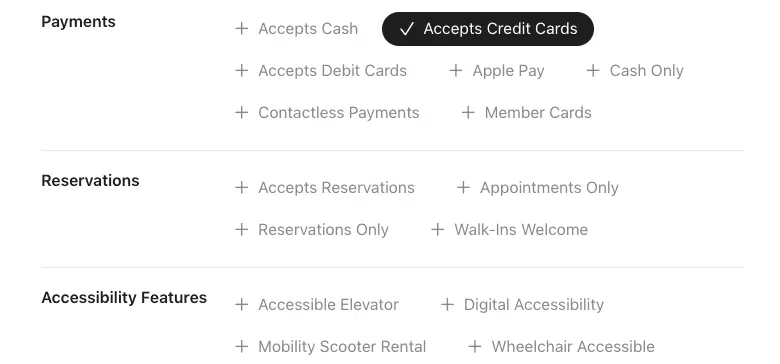
Credit: Search Engine Land - If your business is located in the U.S. adding “Showcases,” which allow you to update users on announcements and new products or services.
- Repeat this process for additional locations. You can also invite additional users to manage your locations.
Ready to clean up your biz info? Head over to Search Engine Land to read the full post.
Why you should be running in-game ads
JANUARY 29, 2023Last year, ~227 million people in the US played video games and 46% of those were women. Game revenues are projected to reach $285 billion by 2027. In-game ad (IGA) campaigns are a huge opportunity for brands looking to expand marketing campaigns outside their normal scope, become more visible on low-competition platforms, or reach super niche audiences.
Types of in-game ads (IGA):
- Static: ads that can’t be changed after a game release. Example: a video-game character’s branded t-shirt.
- Dynamic: ads that can be changed even after the game is released. Example: a billboard in a driving game that advertises new movie releases.
- Advergaming: a game built as an advertisement. Example: “Chipotle Scarecrow.”
Benefits
- Reach: Gamers represent a large segment of the population and, currently, in-game ads are more cost-effective than other forms of marketing.
- Viewability: In-play ads, like banners, display during the entire length of the game. Interstitials or rewarded ads play during breaks. Ad tech companies are hard at work making these spots hyper-measurable.
- Engagement: A report from Tapjoy found that 64% of consumers are more likely to engage with a retail in-app reward ad than a social media post.
- Brand Safety: Advertisers can customize game genre and placements. Additionally, ad whitelists prevent ads from appearing in inappropriate environments.
Sold on IGA? Head over to Search Engine Land to learn more about targeting and KPIs.

How to Track Advanced Scrolling on GA4
JANUARY 25, 2023Google Analytics 4 will track scroll activity by default with the scroll enhanced measurement event—but only once a visitor reaches a scroll depth of 90%. If you want to track scroll activity at 25%, 50%, 75%, and so on, follow these steps:
- If you haven’t already, install a Google Tag Manager container code on your website.
- Set up your GA4 Configuration tag within your GTM container code.
- Create a scroll depth trigger that includes the scroll depth percentage(s) you want to track.
- Create a GA4 event tag with the scroll_depth event parameter.
- Pair your GA4 event tag with your scroll depth trigger.
- Test to confirm that everything’s working. Then, publish your GTM container to make your tag and trigger live.
- Register a custom dimension in GA4 for your scroll_depth event parameter.
- To prevent duplication in your data, turn off the enhanced measurement event in the GA4 interface for scroll tracking.

Watch the video tutorial by Root and Branch to get started.
How to Generate LinkedIn Leads
JANUARY 24, 2023Is revisiting LinkedIn for connecting with prospects on your to-do list? Whether you’re planning an organic strategy or hoping to leverage LinkedIn ads, here are 5 not-spammy ways to capture and nurture leads on the platform:
- Optimize Your Company Page and Profile for Lead Generation
- Add a custom button to your company page, which can link to your organization’s homepage, a lead magnet, a limited-time offer, or another resource. Use a CTA like “Register” or “Sign Up.”
- Make sure your team members enable Creator Mode to help grow their followings, boost visibility for the organization, and generate data insights about your audience.
- Identify Your Target Audience
- Use your organization’s buyer persona to define your target audience, including job title, corporate department, industry, experience level, location, pain points, and goals.
- Use premium Sales Navigator’s account filters to find businesses that fit your ideal customer profile. Then, make a list of decision-makers.
- Take advantage of LinkedIn’s Creator Analytics to see what content performs best and understand your demographics.
- Enhance Your Lead Generation Content Strategy
- Share high-value, mid-funnel content designed for users in the consideration stage. Test LinkedIn articles, carousels, and documents for engagement.
- Host a LinkedIn event to provide value for your audience and guide prospects toward the next step.
- Improve Your Organization’s Visibility
- Set aside time to interact and engage with decision-makers on your feed.
- Create a content plan for your founders, CEOs, and VPs to follow.
- Leverage LinkedIn Ads
- Identify your top-performing lead magnets and use Campaign Manager to set up a lead generation campaign.
- Promote some of your best native LinkedIn content.
- Retarget leads who engaged with your lead form or event and prompt them to take the next step.
Read more at Social Media Examiner.
Is Your Website Accessible?
JANUARY 23, 2023Web accessibility helps people with disabilities navigate a website more easily. Not only does web accessibility make for a more equitable digital landscape, but its almost always better for your SEO. Consider the following types of accessibility needs:
- Visual Impairment. Users with permanent of temporary blindness, low vision, and color blindness may use screen magnifying software or rely on screen readers, such as JAWS and NVDA, to read digital text aloud and describe images on the web.
- Hearing Impairment. Users with hearing loss may require transcripts or subtitles to access and interact with web content.
- Motor Impairment. Users with limited fine motor control may use customized devices to navigate web content, such as a head pointer, speech recogntion, or mouth sticks.
- Cognitive Impairment. Users with learning disabilities may benefit from consistent layout and navigation, clear copy, and video content.
There are a number of guidelines to help measure your web accessibility, such as the Americans with Disabilities Act (ADA), the Web Content Accessibility Guidelines, and the Accessible Rich Internet Applications suite of web standards. Here are some top-level considerations for your design and development team:
- Alt text is imperative to make images accessible to users with screen readers.
- Provide alternative adaptations of your multimedia, so users can access your message in a variety of modes.
- Ensure that your website is fully navigable by keyboard.
- Search boxes, site maps, and all site structures should have logical and intuitive navigation.
- Use high color contrast (min: 4.5:1 for normal-size text) and provide the option to change the color combination in the web browser.
- Make your forms accessible for assistive technology by labeling the fields you want users to click on or type in.
- Limit moving, flashing, and blinking content. Allow users to adjust or turn off these features in order to process information.
- Make your text zoomable without affecting the rest of the content.
Get the full download on Web Accessibility and related resources at Hostinger.
Insights
View AllStrategy7 MIN READ

The AI SEO Checklist: How to Stay Visible in the Age of AI Search
Ana Toigo
Marketing5 MIN READ

Top Marketing Tools That Offer Nonprofit Discounts (2026)
Rich O'Donnell
Strategy4 MIN READ

Sharpen Your Core Skills: Listening, Remembering, and Note Taking
Rich O'Donnell
Uncategorized4 MIN READ
Dialogues: Kimberly Bailey, Head of Marketing at Alpaca
Shannon Sankey
Content2 MIN READ

Know Your Audience: Avian & Saurian Edition
Rich O'Donnell
Content3 MIN READ

Which comes first, the copy or the design?
Rich O'Donnell
Content4 MIN READ

How to Speak Like a Customer—Not Your CEO
Rich O'Donnell
Content4 MIN READ

The New Search Paradigm: How Marketers Can Prepare for SGE
Shannon Sankey
Content2 MIN READ

5 Tips for Marketers Who Hate Writing
Shannon Sankey