
Here We Go Again 😮💨
What makes content worth reading when it’s all been said before.
The savvy marketer's hub for industry news, insights, resources, and culture.
The Pantone Palette Generator, currently in open beta and built on Microsoft Azure, is an AI-powered tool that does what it says.
It integrates a chat-based interface into Pantone Connect, which lets you quickly generate palettes based on inspiration, trends, or emotional cues.
You can ask it things like, “What colors evoke optimism in Gen Z?” or “Show me palettes inspired by 1970s fashion editorials,” and it will give you ready-to-use combos informed by Pantone’s trend forecasting and Color Insider insights.
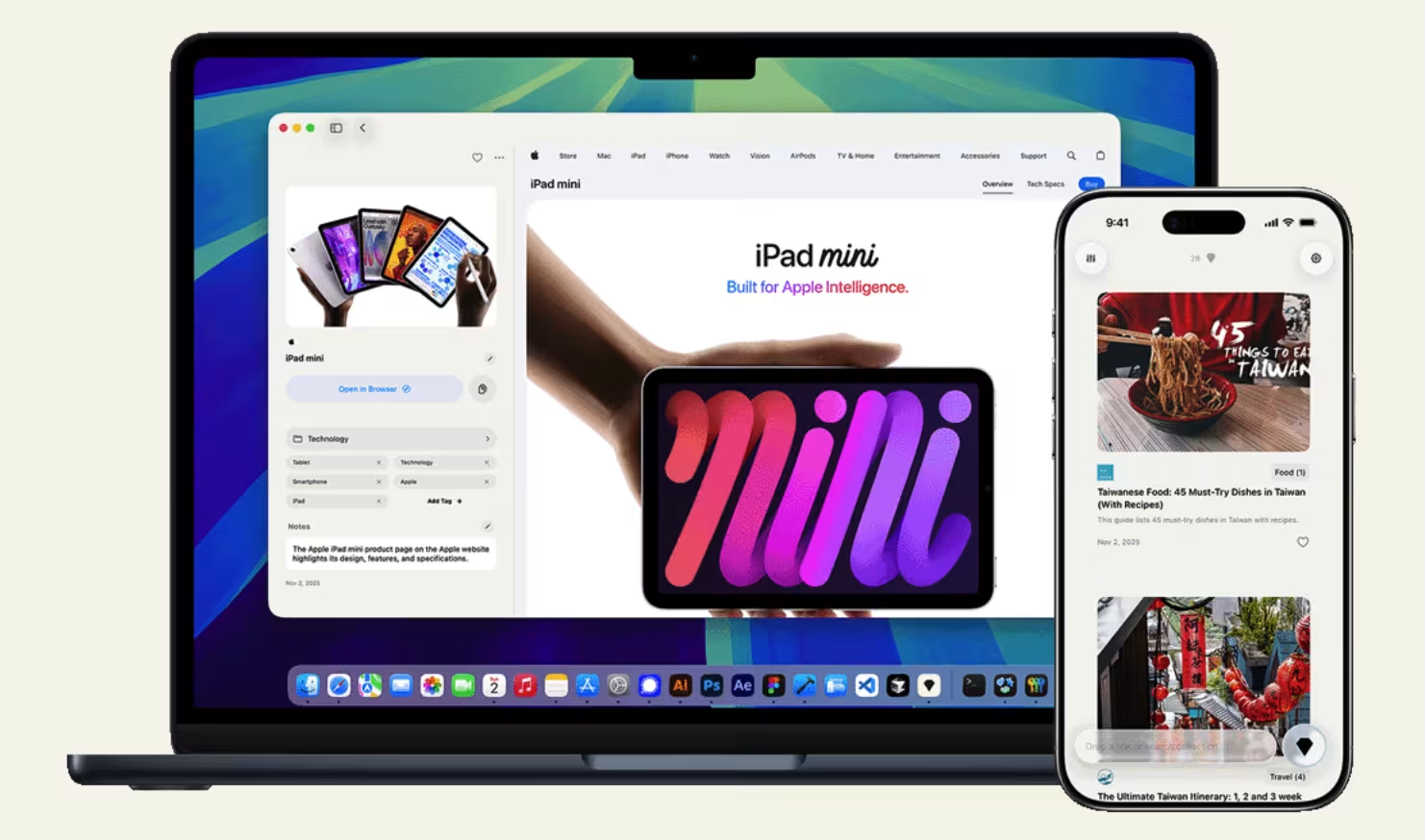
Gempod is a bookmarking app powered by Apple’s on-device AI for saving, organizing, and rediscovering your bookmarked links.
It automatically analyzes and categorizes links the moment you “drop a gem.” If you’ve copied a URL, the gem icon instantly appears, allowing you to tap to save to an organized library.
From there, Gempod’s AI suggests categories, tags, and even a brief summary. Everything runs privately on your device and syncs through iCloud.
Flow is a voice-to-text AI tool that turns your spoken words into polished writing.
Unlike other transcription tools, it edits in real time, removing filler words, correcting grammar, and formatting sentences for you.
It’s AI maintains a personal dictionary and snippet library for custom shortcuts, so it can adapt to your voice, tonal context, and workflow.
It’s available on Mac, Windows, and iPhone.
Superinbox connects to Gmail or Outlook in one-click to draft replies, organize your messages, and save you up to an hour daily.
Using AI, it pre-writes emails in your voice, leveraging your email history and uploaded documents to get the context right. The calendar integration pulls your free slots into replies, too.
It also automatically categorizes incoming emails, and you can customize rules or rely on AI-driven sorting.
Superinbox connects to Gmail or Outlook in one-click to draft replies, organize your messages, and save you up to an hour daily.
Using AI, it pre-writes emails in your voice, leveraging your email history and uploaded documents to get the context right. The calendar integration pulls your free slots into replies, too.
It also automatically categorizes incoming emails, and you can customize rules or rely on AI-driven sorting.
Postiz is an AI-powered social media management platform with support for over 25 channels.
Cross-post, schedule, and view analytics from a single dashboard. Use the AI content assistant to generate post ideas, design visuals, auto-post, and engage with followers.
And your team can collaborate, track performance, and refine strategies based on insights.
YouTube’s Ask Studio is a new chat-based assistant inside YouTube Studio designed to turn mountains of data into actionable insights.
Instead manually combing comments and dashboards, you can now prompt Ask Studio for performance breakdowns, sentiment themes, or content ideas based on what your viewers already love.
Think: “Why did this video dip?” or “What topics are trending in my comments this week?”
It’s currently U.S.-only and English-only and still in early testing.
Adobe and YouTube are teaming up for a new integration.
Create for YouTube Shorts is a dedicated space inside Premiere mobile where you can craft, customize, and publish Shorts directly to YouTube.
You get multi-track editing, Firefly-powered AI tools, generative sound effects, and ready-to-use templates built specifically for short-form storytelling.
The Create for YouTube Shorts feature in Premiere mobile will roll out soon.
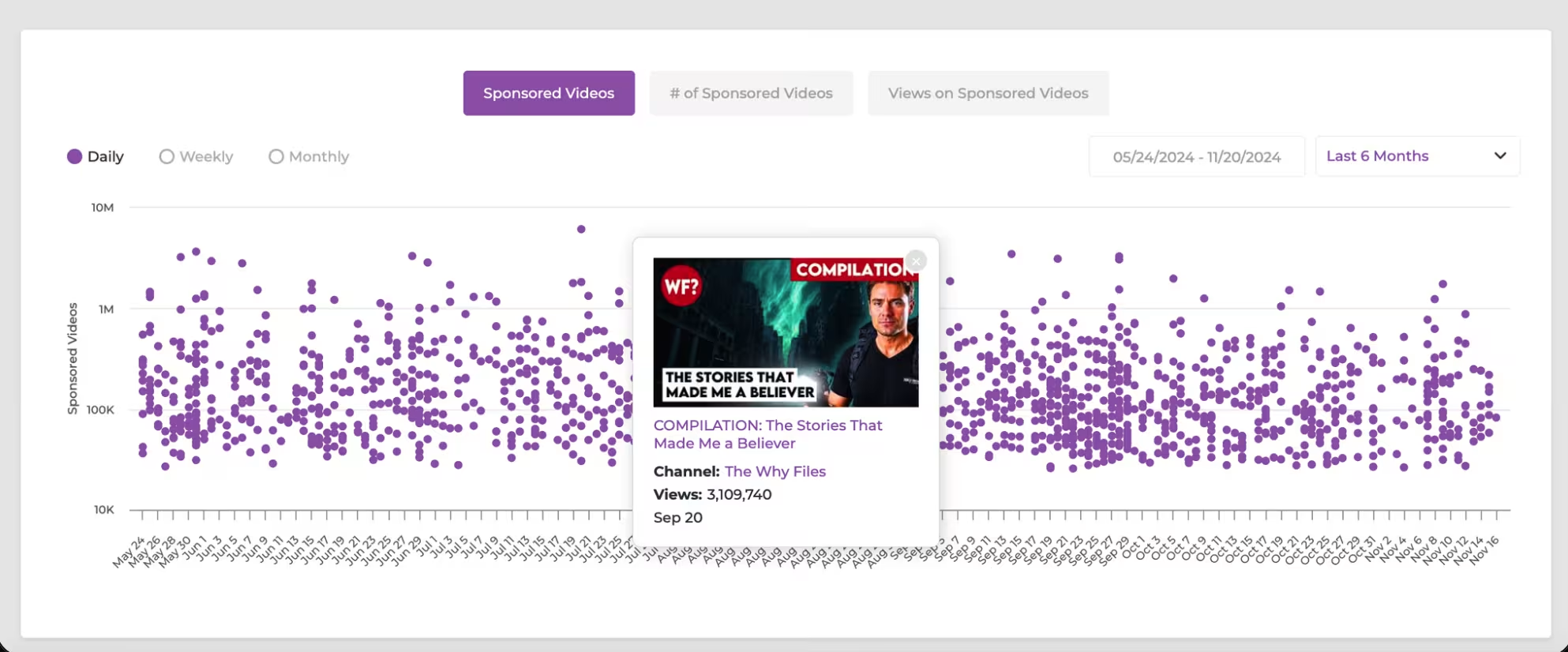
Gospel is a data platform that helps marketers understand who is sponsoring whom (and when, and why) across YouTube.
It’s handy for identifying trending creators before they pop off, pinpointing which brands are investing in influencer marketing, and building custom reports that guide your strategy.

Ana Toigo
Ana Toigo
Ana Toigo

Ana Toigo

Ana Toigo

Ana Toigo

Rich O'Donnell

Rich O'Donnell

Shannon Sankey


