
The Daily Carnage
The savvy marketer's hub for industry news, insights, resources, and culture.
Today’s Issue
Issues
View All
Emotional Advertising: How Brands Use Feelings
MAY 8, 2022For the most part, people don’t make purchases based on information alone, and emotional purchases are made more often than informed purchases. That’s where emotional advertising comes to play.
Not only does emotional advertising make more of an impact on audiences, but it also makes your content more shareable because it’s more relatable.
A Few Examples of Emotional Advertising Angles:
- Happiness – When it comes to brand association, you wanna keep it on a high note. Funny, happy, entertaining content makes for positive brand association and more sharable content.
- Pride – Appealing to your audience’s sense of pride makes them feel good about themselves. This can be in the form of things like activism, cultural topics, and achievements.
- Fear – In some cases, fear can be a very effective emotion for immediate action. PSAs come to mind.
- Anger – Anger is an approach that can help align an audience with a brand over a problem.
- Greed – We live in a consumer society where people tend to want the newest and latest of everything. Raise your hand if you get FOMO easily.
Tips to Implement Emotional Advertising:
- Understand your audience’s motivations and preferences by building a buyer’s persona (or two).
- Use storytelling to make longer lasting emotional brand association.
- Keep it genuine to your brand or consumers will sniff out the inauthenticity.
Sometimes you just gotta hit ’em right in the feels. The full Stevens & Tate blog gives real brand examples using emotional advertising so check it out for more.
Top 4 Reasons Why Case Studies are Important for Your Brand
MAY 4, 2022In a survey of 121 SaaS marketers, they ranked case studies the #1 most effective marketing tactic to increase sales. That beat out their general website content, SEO, blog posts, and social media!
But it’s not just a piece made for B2B SaaS brands. It’s something every brand can implement for generating leads and traffic or gaining thought-leader clout. Need more convincing to create case studies? Here are the top 4 reasons case studies are important:
- They demonstrate your expertise: Case studies are a chance to show off your knowledge in a niche, the results you got for past clients, or just your overall expertise in your general industry. They are also great for standing out amongst competitors that don’t have any.
- They can show social proof: Customers love reading what other customers have to say about something before they bought it. So take your best reviews and testimonials and turn them into more advanced UGC.
- They can help your sales funnel: If you have a unique product, service, or process, you may need more than a quick 1-2-step to explain it. Help potential customers understand how you meet their needs with real world examples and visual aids in a case study.
- They can strengthen customer relationships: It can feel like a big ask for in-depth testimonials or interviews for a case study, but your client may be flattered to help. It shows you value the journey of their project and the outcome.
Case studies can be used for SEO-boosting content, gated content for collecting leads, and can even end up being shared in a way that gets your brand more recognition. There’s really no downsides to making them! Check out the full post by Uplift Content for more case study deets and their checklist for good ones.
6 Tips for Writing Attention Grabbing Post Titles (with Templates)
MAY 3, 2022Sometimes you just need a little inspiration to get you in the right direction. Designer Blogs put together these 6 tips for making titles and headlines that will grab a reader’s attention. They also gave dozens of templated lines of copy for you to get started.
Let’s dive in!
Keep Titles Short & Focused – Try and be as effective as possible with just a few words when you can. A straightforward template: The Dos and Don’ts of _____
Use “How To” Titles – It’s a great way to demonstrate helpfulness to a reader, and even better for SEO purposes because Google loves instructional content. An easy peasy template: How to _____ with _____
Ask Questions – Questions are a great way to resonate with your specific audience. A common Q: What is Going on with _____?
Use Numbers & Lists – Readers love lists that are easy to digest so let them know directly that posts or pages have that. This is another great format that Google loves to reward in search results. A common template: # Proven Ways To _____
Use Solid Action Verbs – Now that you have some frameworks, boost the titles with the right verbs. Some favorites: Build, Create, Generate, Maximize
Use Powerful Adjectives – Pump it up with some adjectives! Just don’t overcrowd your copy with them. Some more favorites: Clever, Proven, Successful
Blog post titles, subject lines, and headlines are your chance at a great first impression. See the full post by Designer Blogs for templates at your finger tips to make attention grabbing headlines.
A/B Testing: Email Elements to Test + Mistakes to Avoid
MAY 2, 2022There are a lot of variables for email content that can make or break your conversion. But when it comes to A/B testing, many people test subject lines only. Granted, that’s where it all starts for someone opening your email…but what about everyone who opens it then bounces?
Here are different elements that can be A/B tested:
- The Sender Name – First Name / Full Name. Person’s Name / Brand Name. Email Address 1 / Email Address 2.
- The Subject Line – Subejct Line Option 1 / Option 2. Short / Long Copy. Personalized / General. Questions / None. (And so many other things depending on what you are marketing).
- The Preview Text – (Similar to subject lines) Preview Line Option 1 / Option 2. Short / Long Copy. Personalized / General. Questions / None.
- The Time of Sending – There are two big questions here: Does timing around a trigger event make a difference? What frequency works – daily, weekly, monthly, or quarterly?
- The Content – Same sandwich, different meat. Layout 1 / Layout 2. Short / Long Copy. Image Heavy / Text Heavy. Numbers + Stats / None. Personalization / None.
- The CTAs – Copy 1 / Copy 2. Placement 1 / Placement 2. Color 1 / Color 2.
Common A/B testing mistakes:
- Sometimes you don’t want to do a 50/50 split of your full list. Test a smaller sample first, then determine if A or B should happen to your full list.
- On that note, don’t lump everyone together. Test depending on behavior segments.
- Form a hypothesis before an A/B test and determine your measurement goals before seeing the results.
- Test one element at a time. It’s slow going work, but it will get you the most accurate insight on what is or isn’t working.
- Never. Stop. Testing. Things change. So an A/B test may give a certain result one quarter before your engagement changes in the next.
Check our Convertcart’s full blog post for more testing ideas, stats, and brand examples.
A 6-Step Framework for Running Social Media Experiments (+ 87 Ideas)
MAY 1, 2022We’re getting scientific on ya. Social media and content creation is, after all, an art and a science.
When it comes to getting experimental with your social media, it can feel like you are shooting in the dark. But you can take a strategic approach to how you introduce different content to your regularly scheduled programming.
And it goes a little something like this:

- Set Goals: What’s the point of this experimental content? Since no brand ever has the exact same social media KPIs, you have to start with your own and then break down any possible “micro-goals” you have for any given post.
- Brainstorm: You may have already started on this step before your goals. This is where you take ideas and form a hypothesis around them. Form a hypothesis with this format: “If we (experiment idea), then (expected results), because (assumptions).” Then as with any marketing initiative, study what others are doing. They may have experimented with you already.
- Prioritize: Now start establishing how these ideas are becoming posts. You can break them down with the ICE scoring system where Impact, Confidence, and Ease are scored 1-10.
- Test: Go see what happens! Some good testing practices include testing one type of post at a time. Give it enough time to measure its performance (1 week is usually enough).
- Analyze + Learn: Time to put the lab coats on analyze the results. What was the post performance? Should you try out different variables with that type of post?
- Repeat: Once you have planned, posted, and analyzed a social media experiment that your brand deemed a success, repeat it! You may have to cycle through steps 4 and 5 several times to get it just right.
Buffer goes into detail, step by step, so you’re gonna wanna check out their post for it and the 87 experiment ideas.
Actionable Steps for Influencing Your Conversions
APRIL 27, 2022We’ve been talkin’ a lot about calculating conversion rates, improving copy, and paid ad channels. Here are some additional things that may be in the way of some of your lead conversions.
These are strategies you’ve definitely heard of but maybe you haven’t connected the dots on ways you can leverage them for your brand.
Leave no stone unturned!
- Improve Your Site Navigation – A big reason for bounces and reasons people haven’t filled out your form may be because they can’t find it. Make sure your nav and IA are making sense.
- Improve Page Load Times – Another reason people bounce? Slooooow pages. Large media files are the usual culprits for a longer load time.
- Ensure Your Value Proposition is Clear – Copy is a matter of trial and error that needs testing continually until you land on things that positively impact your key metrics.
- Videos are More Engaging – So use ’em! Especially if you can use them as a way to directly speak to your customers like demos.
- Your Forms – Experiment with required and optional fields, the number of fields you have, and your headlines for them. If your form abandonment rate is high, you can be sure that your form needs attention!
- New + Repeat Visitor Conversion Rate – New visitors can show you how changes are making an impact as fresh eyes, and repeat visitors are already more likely to convert so find ways to keep them engaged.
- Traffic Sources – So you know where your conversions are coming from and you can target that channel’s journey in a more effective way.
Tools to consider if you don’t use them already:
- Surveys because it never hurts to ask
- Heatmaps so you can see a user’s behavior on your site
- Ticket Systems for direct support and suggestions
- Form Analytics for tracking incomplete and usability
Check out the full post by VWO for more tools and examples.
Social Media Benchmarks to Know in 2022
APRIL 26, 2022If you haven’t check out Sprout’s 2022 Year in Social Report, you may wanna head on over and give it a download. It’s full of great tidbits, stats, and analysis on the state of social media marketing.
What to measure in 2022*:
- Impressions – Impressions measure the number of times your content is displayed. Why do they matter? Exposure is what boosts brand awareness. The more often people see your content, the more familiar they become with your brand. A screenshot of a LinkedIn post from Drift promoting their podcast, “Operations with Sean Lane”.
- Posts published – This is the number of posts published across accounts during a specific period. While this may seem simple, it’s a good foundation of a successful social media strategy to help you reverse engineer the publishing volume needed to reach certain impressions, engagements and engagement rates.
- Total Engagements – This measures the number of times users engaged with your posts during a specific reporting period. It covers all engagements including likes, reactions, retweets and other network-specific interactions as well.
- New followers – Maybe you’re not looking at who is new to your brand too often but according to Sprout, 9/10 consumers will buy from brands they follow on social. Let this chart show you what that means for possible actions:
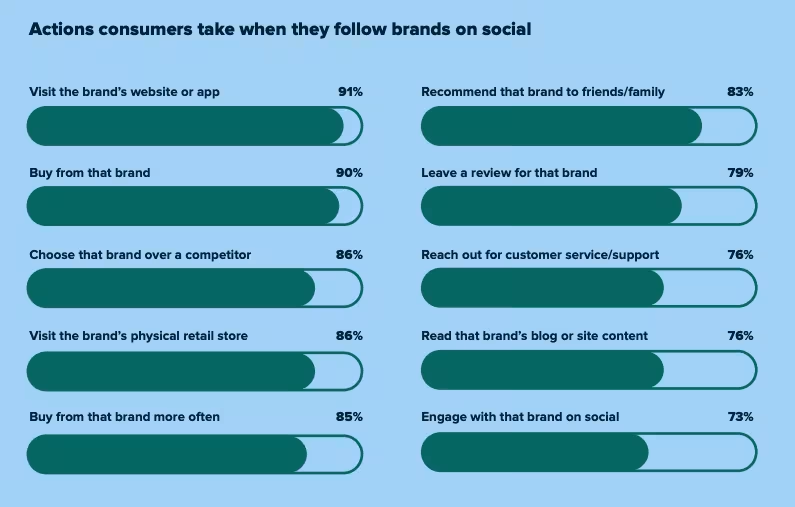
*One big note here – These metrics are network-agnostic, which means you can use them to assess your full social media strategy.
Check out the full report by Sprout for specific industry highlights!
Measuring + Improving Your Email Click-Through Rate
APRIL 25, 2022Opens are great. Clicks are better.
One of the most helpful metrics is your email click-through rate (CTR) as a way to track engagement. So we wanna recap on how to measure it and how to encourage more of it!
What is an Email CTR?
An Email CTR is the percentage of clicks on links within your email based on the successfully delivered emails. The formula looks like this:
(Number of Recipients Who Clicked ÷ Number of Delivered Emails) x 100 = CTR
So what’s a good one? A strong CTR all depends on your industry and content, but you wanna shoot for 2-3%.
How Can You Improve an Email’s CTR?
There are a lot of factors that can influence clicks, so you will have to switch up your approach every now and again. CTAs, design, and language, are just to name some of the influences on your CTR. Here are a few tactics to encourage more clicks:
- Always start with the content – It’s what people are opening your email for in the first place. Tailor email content to the audience. And keep the “above the fold” content as interesting as possible.
- It better be responsive – That’s a given in this day and age. But remember that not only should your emails be mobile-friendly, but the content it clicks to should be, too.
- CTA’s all-day – Here are some CTA best practices: 1) “click here” is boring, be super specific and straightforward instead. 2) Those links better pop visually. 3) A/B test your placement and it’s okay to repeat them elsewhere for skimmers.
- Get your timing and frequency right – Some emails are being read more than clicked because of the time of day or timing for a user journey where someone just isn’t ready to click. Think like a user and test out times.
For more CTR refreshers and real brand examples, check out Twilio Send Grid’s post.
How to Calculate Your Conversion Rate (and then some)
APRIL 24, 2022Conversion rates are one of the many metrics marketers look at to show how something is (or isn’t) working. At its core, it shows you the percentage of visitors to your website or landing page who do what you want them to do (i.e. convert to a customer).
The Basic Formula for Calculating Conversion Rates:
The number of conversions divided by total visitors then multiplied by 100 to get your conversion rate.

Different Types of Conversion Rates:
There are two main types of conversions out there – macro and micro conversions. Macro Conversions are typically used to assess a website’s success via goals and tracking traffic. Anything related to selling or customers can be considered a Micro Conversion.
We gave ya the formula for an overall conversion rate, but you can calculate rates on any specific marketing area. Some other common conversion rates include:
- Marketing channel conversion rate – Is Google Ads traffic or Facebook Ads traffic more likely to convert?
- Page-level conversion rate – Which of these pages is better at converting traffic?
- Campaign conversion rate – Did my targeting changes improve anything?
- Individual ad conversion rate – Do I need to change my ad copy? Does this ad drive more qualified traffic?
- Keyword conversion rate – Which keywords deserve more budget?
What is a Good Conversion Rate?
This is the big Q, right? You tracked your data, but what does it mean to you? Benchmarks all depend on your industry, business model, and marketing goals.
An industry-wide rate is around 3.75%. But a “good” rate for lead generation is around 12%.
Want more conversion calculations and making sense of data, check out WatchThemLive’s full post.
Insights
View AllStrategy7 MIN READ

The AI SEO Checklist: How to Stay Visible in the Age of AI Search
Ana Toigo
Marketing5 MIN READ

Top Marketing Tools That Offer Nonprofit Discounts (2026)
Rich O'Donnell
Strategy4 MIN READ

Sharpen Your Core Skills: Listening, Remembering, and Note Taking
Rich O'Donnell
Uncategorized4 MIN READ

Dialogues: Kimberly Bailey, Head of Marketing at Alpaca
Shannon Sankey
Content2 MIN READ

Know Your Audience: Avian & Saurian Edition
Rich O'Donnell
Content3 MIN READ

Which comes first, the copy or the design?
Rich O'Donnell
Content4 MIN READ

How to Speak Like a Customer—Not Your CEO
Rich O'Donnell
Content4 MIN READ

The New Search Paradigm: How Marketers Can Prepare for SGE
Shannon Sankey
Content2 MIN READ

5 Tips for Marketers Who Hate Writing
Shannon Sankey

