
The Daily Carnage
The savvy marketer's hub for industry news, insights, resources, and culture.
Today’s Issue
Issues
View All
Your TikTok Statistics Snapshot
MARCH 21, 2022It’s TikTok Tuesday! Here’s our favorite branded TikTok this week.
Now, we all know TikTok has been quickly establishing roots for becoming the biggest social media platform out there. Here are the stats to know now:
-
- TikTok was the most downloaded app of 2021 (and for the third year in a row), with 656 million downloads.
- TikTok also continues its streak as the top-grossing app, surpassing $2.5 billion in consumer spending in 2021.
- TikTok has over one billion monthly active users. An average of 650,000 new users join daily.
- 4.3% of internet users named TikTok as their favorite app. That’s less than a third as many users as those who favored Instagram (14.8%) or Facebook (14.5%)
- Android users spend 19.6 hours per month on TikTok. YouTube is still in the top position, holding users’ interest for an average of 23.7 hours each month.
- 93% of top-performing videos use audio.
- The highest performing videos are 21-34 seconds long.
- Adding captions increases impressions by 55.7%.
- TikTok ads reach 17.9% of all internet users aged 18+ (884.9 million people).
- 67% of users say TikTok inspires them to shop with 73% reporting that they feel a deeper connection to companies they interact with on TikTok.
Check out the full collection of TikTok stats and predictions from Hootsuite.
Preparing for Google Analytics 4 (because it’s taking over)
MARCH 20, 2022It’s been over 2 years since Google Analytics 4 (GA4) was introduced as the next Google Analytics phase. But some marketers aren’t ready to give up Universal Analytics. After all, GA4 streamlined a lot of the metrics marketers were holding near and dear to their data-tracking hearts.
While Google has been allowing the use of both systems at once, the time has come when GA4 is taking over. That time is a year from now –– July 1, 2023.
Don’t freak out! There are a lot of benefits to GA4 (and the features are growing) so this is your time to transition over.
The Big Things to Know:
- All standard UA properties will stop processing new hits on July 1, 2023
- 360 Universal Analytics properties will stop processing new hits on October 1, 2023.
- You’ll be able to access your processed data in UA for at least six months.
- You have 3ish months to move to GA4 if you want clean YOY data in 2023 (!).
Starting Your GA4 Measurements:
You’re going to want to move over to Google Analytics 4 as soon as possible to track the necessary historical data before UA stops processing new hits. Like we said, some good things are happening in GA4. If you haven’t played in GA4 yet, here are some things to get familiar with:
- Event-based measurement modeling across sites and apps.
- Country-level privacy controls (and a huge emphasis on privacy in general when it comes to user-level data).
- Predictive insights from machine learning.
- Expanded integrations with other Google products like Google Ads.
- Search Ads 360 and Display & Video 360 integrations are now available for all customers!
Google will be updating more helpful tips on GA4 transitioning and terminology, but for now, check out how GA4 is being used before it’s all we have to use.
How to Make a PICK Chart
MARCH 16, 2022When it comes to planning ahead, it helps to visualize your initiatives. Calendars, Difficulty Matrixes, and project timelines are all great options to do it. We want to share the PICK chart as another option.
A PICK Chart is a Lean Six Sigma (LSS) tool used to categorize ideas and gets the name from the quadrants it uses:
- Possible – easy, low payoff
- Implement – easy, high payoff
- Challenge – hard, high payoff
- Kill – hard, low payoff
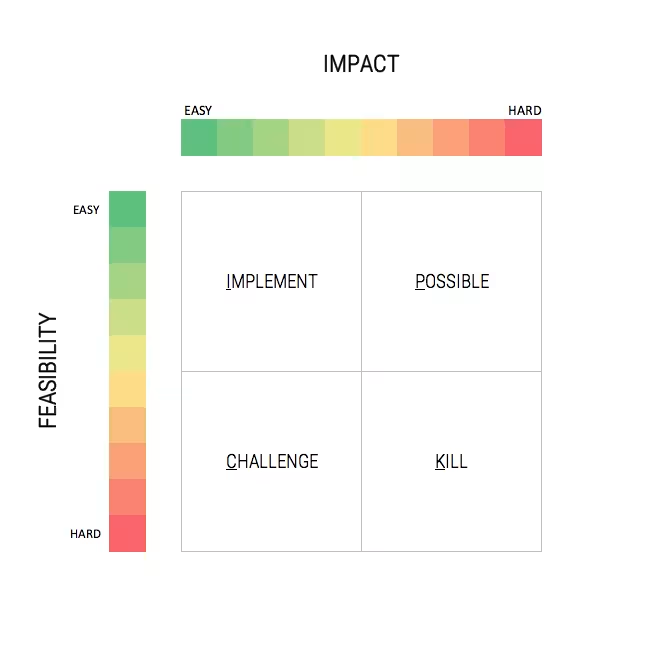
It’s perfect for answering a singular question for individual tasks to map out or for big-picture brainstorming. Here’s how to use it (it’s super easy):
- Draw a 2×2 matrix either on paper for smaller-scale ideas or a whiteboard for bigger planning.
- Write ideas using sticky notes or tabs before you start placing anything on the chart.
- Place the notes on the grid based on the payoff and difficulty levels. Try to make it as definite as possible (no half-placed notes).
- Follow up (the most important step) on the items now that they’ve been prioritized based on where they land on the feasibility and impact. That can mean making timelines or moving resources.
Check out Think Insight’s full directions on how to use this chart and more ideas on how this could help your brainstorming and tackling initiatives.
How to Treat Your Job Hunt Like a Targeted Marketing Campaign
MARCH 15, 2022So for anyone who’s on the hunt or getting ready to start looking, the job market is an interesting landscape right now. It’s tight for competition while also being a candidate’s market overall. So if you’re someone looking for a new role, you have to outsmart other candidates for the roles you really want.
So do what you do best: target your audience. Even if you are not actively looking, you can stay in the loop of perfect positions down the line. Here’s how:
- Know yourself: First, start with asking yourself where your career stands before you look to advance it further. Are you missing any experience, certifications, nice-to-haves for your next ideal role?
- Don’t miss a thing: Set your feeds up for success. Keep a pulse on your favorite companies and companies related to them. That can mean following them more closely on LinkedIn or even automating your feed with specific industry news.
- Expand your network ahead of time: Ideally, you want to have connections with your favorite companies before you’re applying to their openings. Have an outreach template or two at the ready that you can easily personalize.
- Track their openings: Once you’ve done steps 1-3, you can be really prepared to target openings, not just companies. Set your feeds up for alerts on their openings so you can be ready to apply on a ping.
- Bonus step! Research keywords: When you’re researching companies you would like to work for, research their industries for hiring keywords. When you’re tailoring your application, use those keywords in your resume to align your experience to their role.
Startup Decoder wrote this article for the tech industry, but the advice rings true for marketers, too. Check it out to see other ways you can filter your job search.
Your QA Checklist Before Launching Any Email
MARCH 14, 2022Quality assurance isn’t the sexiest part of marketing, but it is essential. Especially when it comes to emails where there is no Command + Z or revisions.
Luckily, Litmus exists for the rookies and the veterans alike to check their emails for goofs. They have a nifty downloadable checklist for you and your team to double and triple-check as part of your email process. Here are some things to ask yourself when it comes to your email before launch:
- What’s the point? We’ll say it once, we’ll say it a million times. You gotta start with goals. It’s not enough to shoot your shot and see what happens, especially with the cost involved.
- Did you check for spelling? Read it again. Just in case.
- Who? Who? Who? If you have your list ready, great! But you better make sure they know who the email is coming from. Make sure your sender information is correct and reputable.
- Did you check for spelling? Everyone makes typos, so get the robots like Grammarly to help out.
- Does it work? This is a loaded question, but you have to check it across multiple email carriers and displays. So while it might work on desktop Apple Mail, it might get funky on mobile Outlook. And then of course it has to load quickly.
- Does it glow in the dark? Dark mode email is becoming more and more popular and many brands are missing the mark for these design practices.
- Did you check for spelling? Litmus doesn’t list spellcheck 3 times in their list, but they should. We’re no stranger to a stray misspelling and it’s a bummer when it happens.
- Did you click it yourself? You know your QA is solid if you: Click. Every. Link. You might be surprised how many times you find a missed hyperlink.
Download the 29-item QA checklist for yourself from Litmus!
Optimizing Your Site for Google’s New UX Criteria
MARCH 13, 2022Google designed Core Web Vitals to improve the speed, interactivity, and layout of a site’s pages. So if you follow these Core Web Vitals, your site will be looking good in the eyes of Google. Who doesn’t want that?
Here’s what to know about Google’s Core Web Vitals and their UX criteria.
What Are the Core Web Vitals?
There are three Core Web Vitals that Google measures for a page’s user experience:
- Largest Contentful Paint (LCP): This measure looks at the time it takes for a page’s main content to load. Ideally it should load within 2.5 seconds.
- First Input Delay (FID): This measure is the amount of time it takes your page to become interactive. This should take no longer than 100 milliseconds.
- Cumulative Layout Shift (CLS): This measure is for visual stability and looks at how often a user experiences unexpected shifts in a page’s content. Google has a layout-shift score, from the Google Search Console Core Web Vitals Report. The target is less than 0.1, with a score of zero being ideal.
So What Steps Can You Take to Please Google?
- Implement lazy loading for your less essential content.
- Compress and optimize your visuals for better load times.
- Keep design simple and avoid bloated templates.
- Know your largest on-page element the best to keep your main content fast.
- Test your site on mobile (duh) for CTA functions and enabling Accelerated Mobile Pages.
Wanna see how your site is doing so far? Try Google’s PageSpeedInsights.
Check out the full UXmatters article to learn more about optimizing your site and the Core Web Vitals measurements.
The Top Tools for Marketing Research
MARCH 9, 2022Conducting your own market research is a great way to determine what customers are looking for, industry trends, and new ways your product can fill gaps. Thanks to the internet…research can be backed by a wider net and is super accessible to the average person.
ToolsRush put together a list of over 25 easy-to-use (and mostly free) research tools out there! We can’t fit them all, but we wanted to list some of our favorites from each category.
Statistics: Pew Research Center for its reliable demographic information and industry statuses
Content Research: Feedly because it aggregates and tracks internet content into one place
Survey Tools: Typeform for its beautiful surveys and an amazing dashboard to analyze responses
Social Insights: Make My Persona for, as the name suggests, easy consumer persona generating
Research Automation: Zapier for the full-scale workflow automation and all its integrations
Ready to get your own research show on the road? When it comes to research, it helps to have a plan. Keep a few questions in mind before you get started:
- What are you trying to find out?
- What kind of information is available?
- Where do you get the data from and how reliable is it?
Check out the full ToolsRush list to see what resources you could use for marketing research.
How to Prepare for Google’s “Topics” + Cookie Alternatives
MARCH 6, 2022By now, everybody has been made aware that third-party cookie data is on the outs and will be phased out by Google in 2023. But, that hasn’t stopped advertisers from using them now without thinking about the potential for a “measurement blackout” down the line.
We’re here to give you the latest on Google’s privacy updates and what it means for your marketing.
How Topics work for users:
At the beginning of 2022, Google’s new Privacy Sandbox proposal introduced “Topics” that will replace Federated Learning of Cohorts (FLoC). FLoC, a type of web tracking, was the original alternative Google was going to take for its phase-out of third-party cookies. From a user’s POV, here is how Topics work:
- Topics uses categories that represent a user’s top interests for that week based on browsing history.
- They’re kept for three weeks and then old topics are deleted.
- When browsing a participating site, Topics picks three categories to share with the site and its advertising partners.
- Users can adjust their Chrome settings to see the Topics, remove them, or disable Topics completely.
What do Topics mean for advertisers?
- Some fear: The goal of Topics is contextual advertising, so instead of individual user data, ad relevancy is going to depend on these interest categories. Advertisers are fearing a drop in accurate targeting and opt-ins in general, but time will tell on this.
- Some waiting: Google is still releasing more information on Topics (such as the exact list of categories used). So there is still more to come on how marketers can get their strategies aligned to the major Google and Apple updates.
- Some shifts: With that being said, cookies affect in-browser advertising. Many advertisers are leaning to the outlets they don’t affect –– paid search, social media, streaming audio/video, or CTV.
Learn more about how to prepare for Google’s Topics and what marketers think about it in Marketing Dive’s article.
Podcast Planning: 8 Formats to Consider
MARCH 1, 2022Not all listeners enjoy the same type of podcast, so your choice of format has a big impact on your podcast.
Your format isn’t just about pleasing your listeners. It helps you plan! When you choose a consistent format to follow, it guides how you create content, if you invite guests (and who), and how you record episodes. So where do you start with choosing a podcast path? Let’s lay out some options.
Here are 8 popular podcast formats to consider for your podcast:
- The interview podcast – You have to start with a central host that can have great conversations, then bring on new guests. The interviews should bring unique expertise and experience.
- The solo podcast – Instead of talking with guests for a perspective, it’s the experiences of a single host. It’s a popular format because all you need is you! Spice it up with listener input if you want (advice or callers).
- The conversational podcast – The more the merrier! Bounce off another host without making it an interview-style conversation.
- The panel podcast – Take your interview podcast, but pump up the number of guests to explore a topic with more experts.
- The non-fictional storytelling podcast – Marketers and brands are always aiming to be good storytellers. While telling real-life events might not fit your brand, you can learn storytelling from this format.
- The fictional storytelling podcast – Also known as “podcast theater.” Think of it like audio television for story entertainment.
- The repurposed content podcast – This is popular for taking existing content and turning it into audio renditions, summaries, or segments to expand your reach.
- Your own podcast – Remember, you’re not locked into one lane. You can always switch formats or combine them to make it work for your podcast and listeners. It’s authentic when you make it your own.
Check out real podcast examples, pros, and cons for each format on Castos’ post.
Insights
View AllStrategy7 MIN READ

The AI SEO Checklist: How to Stay Visible in the Age of AI Search
Ana Toigo
Marketing5 MIN READ

Top Marketing Tools That Offer Nonprofit Discounts (2026)
Rich O'Donnell
Strategy4 MIN READ

Sharpen Your Core Skills: Listening, Remembering, and Note Taking
Rich O'Donnell
Uncategorized4 MIN READ

Dialogues: Kimberly Bailey, Head of Marketing at Alpaca
Shannon Sankey
Content2 MIN READ

Know Your Audience: Avian & Saurian Edition
Rich O'Donnell
Content3 MIN READ

Which comes first, the copy or the design?
Rich O'Donnell
Content4 MIN READ

How to Speak Like a Customer—Not Your CEO
Rich O'Donnell
Content4 MIN READ

The New Search Paradigm: How Marketers Can Prepare for SGE
Shannon Sankey
Content2 MIN READ

5 Tips for Marketers Who Hate Writing
Shannon Sankey

