
Here We Go Again 😮💨
What makes content worth reading when it’s all been said before.
The savvy marketer's hub for industry news, insights, resources, and culture.
Fireflies automatically records your meetings and organizes your team’s knowledge in one place.
All you have to do is connect your calendar, include a dial-in number and capture away. Fireflies integrates with over 15+ leading providers.
There’s a free version with enough features to be dangerous.
Videos with captions get 15% more shares and 26% more CTA clickthroughs.
Enter Quicc.
Quicc’s caption engine automatically transcribes and burns captions onto your videos. We dig!
Sign up for free today.
SquadCast is about making it easier for you and your guests to spend time having meaningful conversations without compromising quality in a remote conversation.
No installs, plugins, or extensions.
If you’re involved with podcasting at all, we highly recommend checking this tool out.
If you’re looking for a tool to grow your search traffic, research your competitors and monitor your niche, Ahrefs will be your new best friend.
Whether you’re looking for backlink opportunities, low-hanging content ideas, or competitive analysis Ahrefs has it all.
There’s a reason why top SEO and marketing experts like Brian Dean use Ahrefs.
Give it a try for a week for only $7. That’s less than 2 Pumpkin Spice Lattes from Starbucks.
Here’s one for all you freelancers and side hustlers.
This freelance calculator reverse engineers your pricing structure by asking your desired income.
It’s simple and free to use. Give it a try.
That’s the advice SubjectLine.com will spit out when you drop in your proposed subject line. It’s free. It’s simple.
Here’s a nifty little tool for ya.
It’s called Read on Mail.
How it works:
You give it a link, and it’ll email you a clean, readable version of an article.
If you’re ready to gamify your marketing efforts, but don’t have the time, we have a suggestion. How about having a student marketer ease your workload?
GenM has a database of over 20k students ready to get on-the-job training. The risk is low and the upside is huge.
GenM is offering Daily Carnage readers $25 bucks off their first month. It’s more than affordable.
There’s a reason companies like Airbnb, WeWork, Shopify and more are using this service.
*It did take us a couple tries to land on the right apprentice, so be patient.
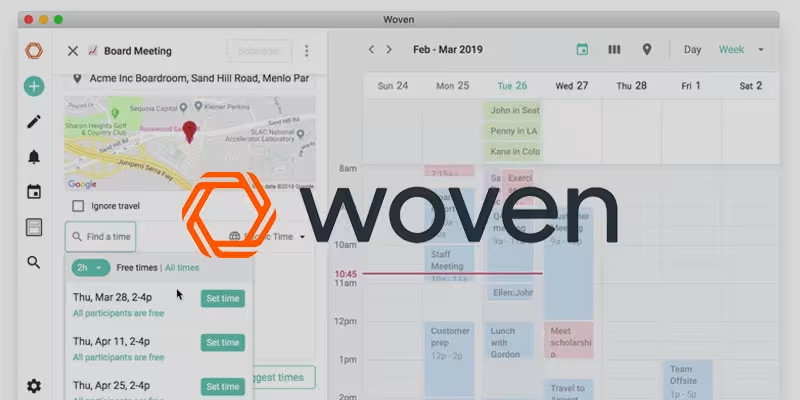
Don’t you hate having to leave one app to open another to schedule a call or meeting?
Not any more. Enter Woven.
We’ve been using Woven the last month and are giddy about it. It has made scheduling client calls and meetings a breeze.
The scheduling links are awesome. The best part is that you never have to leave the app. You can drop the scheduling links in iMessage, email, Slack and more. Woven also syncs with your Google Calendar and G Suite.
Oh ya, it’s free too. Give it a try today.

Ana Toigo
Ana Toigo

Ana Toigo

Ana Toigo

Ana Toigo

Ana Toigo

Rich O'Donnell

Rich O'Donnell

Shannon Sankey


