
Here We Go Again 😮💨
What makes content worth reading when it’s all been said before.
The savvy marketer's hub for industry news, insights, resources, and culture.
You guessed it.
PodClips is an AI‑powered clipping tool built to extract and edit segments from your podcast episodes into shareable video shorts.
Upload your full episode via audio file or link, and then PodClips will select the highlight-worthy clips, resize for various platforms, add captions and custom thumbnails, and generate end‑screens and metadata.
Browser-based busywork? Bah!
CopyCat is a no-code AI automation tool that watches what you do and then does it for you.
Just describe your workflow or upload a screen recording, and CopyCat’s browser agents get the idea without scripts or desktop installs.
It’s cloud-based, schedule-friendly, and built to handle the kind of repetitive grunt work like invoice uploads, dashboard scrapes, data entry, etc, etc, etc.

Google is experimenting with a new feature called Web Guide, available through Search Labs, that reimagines the search results page with help from AI.
Instead of a simple list of links, Web Guide groups webpages into thematic categories based on your query, making it easier to explore different angles of a topic.
Powered by a custom version of Google’s Gemini AI, Web Guide uses a “query fan-out” approach, launching multiple related searches simultaneously to surface more relevant results.
Think of it as a more intelligent, exploratory version of search, especially useful when you don’t know exactly what you’re looking for.
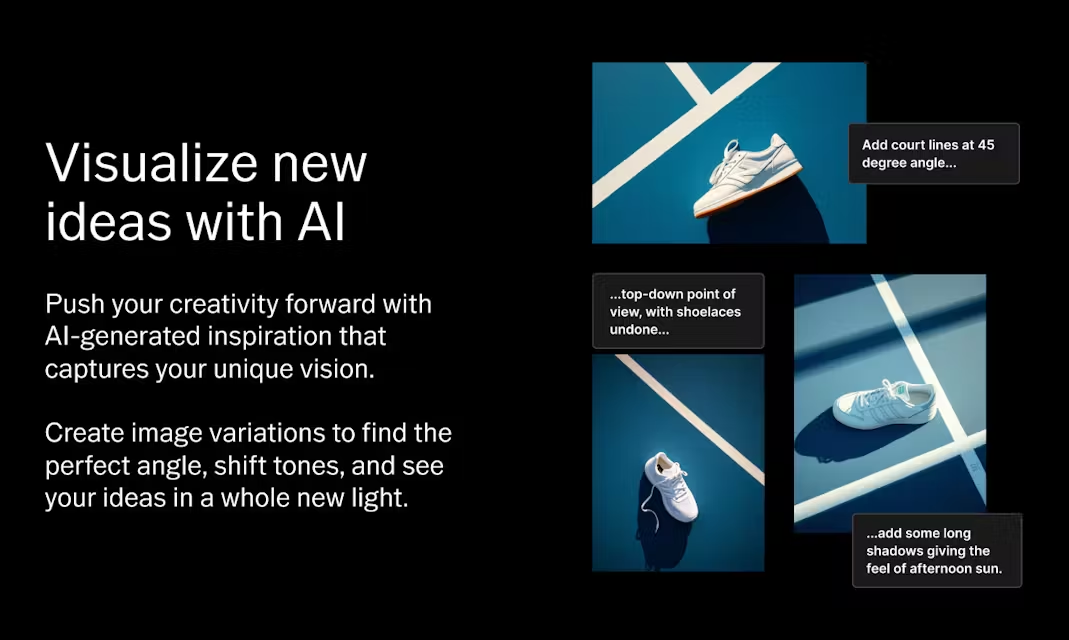
Raise your hand if you live for a good drag-and-drop mood board.
VSCO’s new AI-powered desktop tool, Canvas, is made for visual thinkers and storytellers to ideate, iterate, and collaborate in real time.
While in Canvas, you have access to millions of visuals from the global VSCO community, but you can also generate new images using AI.
It’s free for all VSCO users.
Not sure why we had to wait until 2025 for Laptopers, but it’s here now.
It’s a global community of remote workers dedicated to tracking venues where you can work comfortably and productively.
Not every cafe is laptop-friendly. IYKYK. This bridges the gap between digital nomads looking for suitable workspaces and spots that welcome them.
Confirm the community-verified WiFi speed before you leave the house. Plus, get real-time updates and no ads. Happy squatting!
In a new report, NielsenIQ and World Data Lab illuminate the chronically overlooked consumer power of Gen X.
Gen X is projected to lead global consumer spending through 2033, surpassing $20 trillion. They’re in their peak expenditure years, managing households, children, and aging parents.
The report calls out some crucial “X factors” that define them:
Spend some time with the report to learn how to capture Gen X’s attention.
Coefficient is a data connector that turns Google Sheets and Excel into data hubs.
Cut down on tedious data entry with live, two-way connections to Salesforce, HubSpot, GA4, Snowflake, and a hundred other platforms.
There are automatic data refreshes, scheduled alerts, and even live pivot tables.
Plus, you can update source systems directly from your spreadsheets and set up notifications via Slack or email.
Craft is a flexible personal workspace and hub for capturing notes, organizing research, managing tasks, and developing your ideas.
It prioritizes a native, fast, and offline-first experience. There’s also on-device AI to refine text and extract insights, Markdown support, and Apple Pencil integration.
Choose from 100+ premade styles and personalized formatting, publish your notes to share and collab. Download it for free.
Magic Animator is a new AI-driven, social-first animation tool in early beta (v0.1) designed to help marketers (quickly) bring motion graphics to life.
It can turn static visuals into dynamic animations in just a few clicks by using intelligent presets to auto-generate movement, transitions, and text effects.
Just upload your static graphic, choose from presets (fade, slide, bounce, loop) or take recommendations from AI, and then export for social.

Ana Toigo
Ana Toigo
Ana Toigo

Ana Toigo

Ana Toigo

Ana Toigo

Rich O'Donnell

Rich O'Donnell

Shannon Sankey


